
WooCommerce is free to install, but a store Saudi shoppers will pay on needs much more than the plugin. This WooCommerce setup guide for Saudi Arabia lists what to configure and connect: riyal pricing and an Arabic checkout, a licensed gateway for mada, Apple Pay and STC Pay, instalment options, 15% VAT and ZATCA e-invoicing, shipping zones and courier plugins, and hosting that meets WooCommerce's own requirements. It ends with a cost table, a pre-launch test list and questions to ask a developer. Would you rather have it built for you? See our WooCommerce development in Saudi Arabia service.
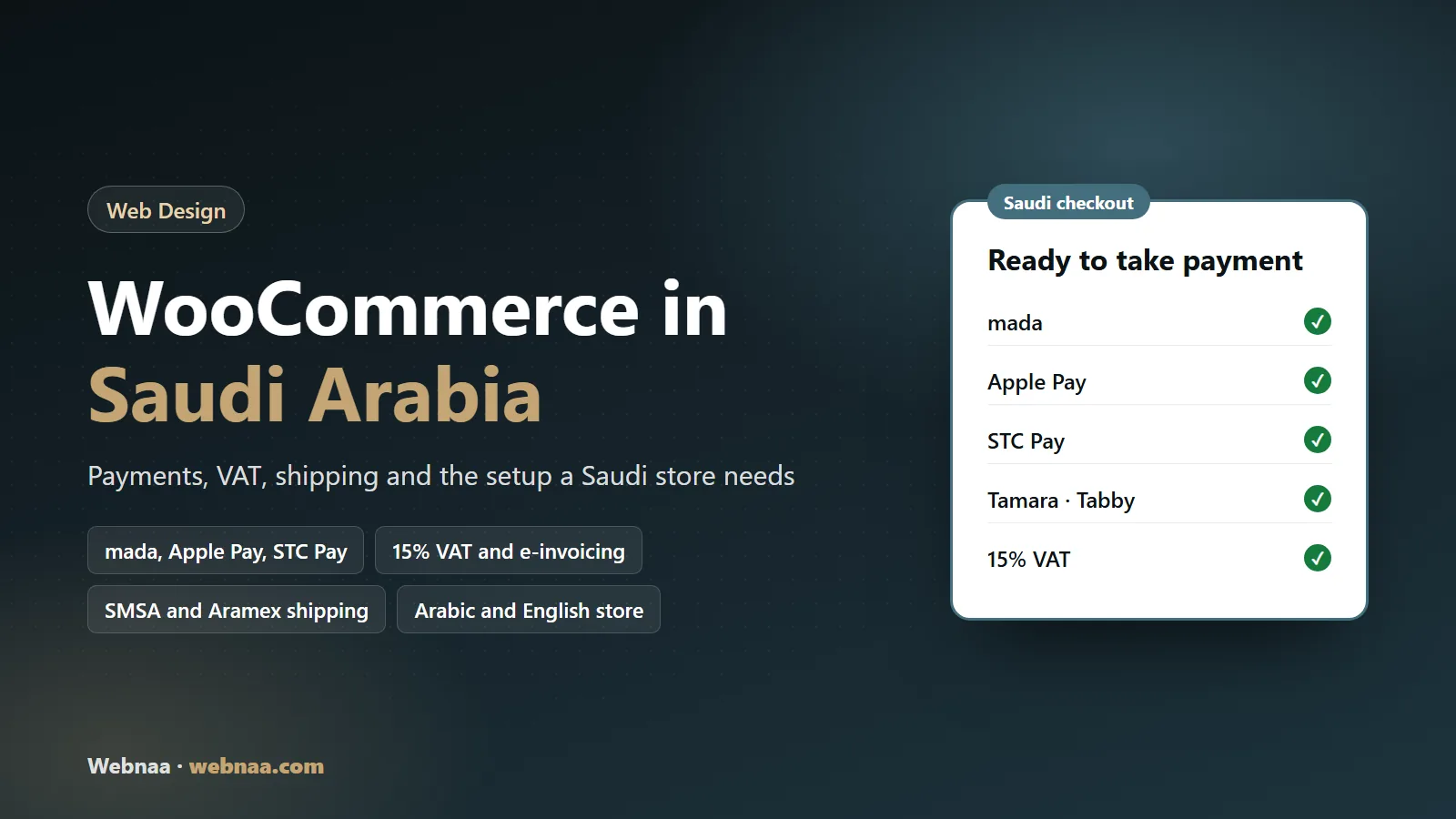
In short:
- WooCommerce core handles products, the cart and orders. Saudi payments, couriers, invoices and the Arabic and English storefront come from plugins and accounts you add.
- Moyasar, Tamara, Tabby, SMSA Express and Aramex each publish their own WooCommerce plugin on WordPress.org. Open every gateway and courier account in your business's name.
- WooCommerce can calculate 15% VAT once you set it up, but it does not issue ZATCA e-invoices by itself. That needs a compliant invoicing solution.
- Budget for the recurring lines too: hosting, yearly extension licences, per-transaction gateway fees and upkeep.
- Before launch, test real orders, refunds, invoices and Arabic emails on a phone.
In this guide
Setting up WooCommerce for the Saudi market
Still choosing a platform? Our Salla vs Zid vs WooCommerce comparison covers that decision. In one line: Salla and Zid run the technology for you, while WooCommerce gives you ownership and makes you responsible for hosting, plugins and updates. The wider project, from the brief to ERP integrations, is in our ecommerce development guide for Saudi Arabia. Here we assume you have chosen WooCommerce.
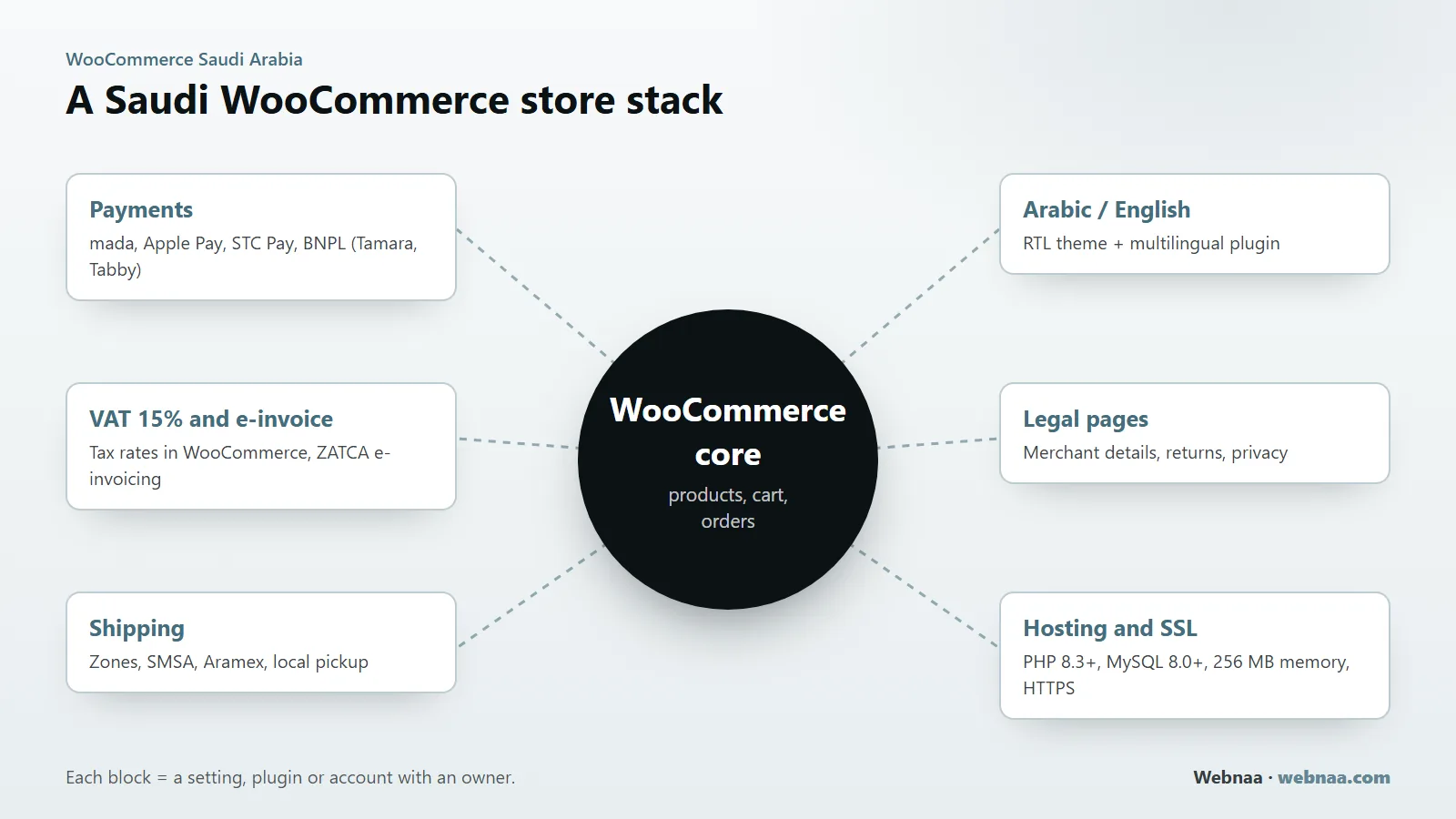
Think of a Saudi WooCommerce store as a core plus six layers. The core stores products, runs the cart and records orders. Around it sit payments, VAT and invoicing, shipping, the Arabic and English storefront, the legal pages, and the hosting. Each layer is a setting, a plugin or an outside account with a named owner after launch.
Currency and number format
In WooCommerce, Settings, General, set the store address to your Saudi city, the selling locations to Saudi Arabia (or only the Gulf countries you really ship to) and the currency to Saudi riyal. The same screen sets the currency position, the thousand and decimal separators and the number of decimals. Keep two decimals: VAT-inclusive prices then add up to the halala on the invoice, and your figures match the gateway's settlement report.
Selling in other Gulf currencies needs a multi-currency extension; charging everyone in riyals is simpler and keeps one set of VAT figures.
Arabic, right-to-left and a bilingual catalogue
WordPress and WooCommerce are both available in Arabic, and WordPress switches the dashboard and the storefront to right-to-left when the site language is Arabic. The theme is the weak point. Choose one that is tested in RTL, then check the product gallery, price filters, the mini-cart and the checkout in Arabic on a phone. A bilingual store also needs a multilingual plugin, and you should decide early what gets translated:
- Product names, descriptions, attributes such as size and colour, and category names.
- Product and category URLs, so the Arabic and English pages can be found separately in search.
- Checkout labels, error messages and every order email.
- Policy pages and the footer with your merchant details.
Addresses and phone numbers
The default checkout fields follow a generic address format, while Saudi customers think in city, district and street. With a checkout-fields plugin or a few lines of code, make the city a required list of the cities you deliver to, give the district its own field, and make the postcode optional unless your shipping rules use it. Make the mobile number required, accept both the 05 and +966 formats, and save it in one format so courier text messages and WhatsApp follow-ups reach the customer.
Weights and dimensions
Set weight to kg and dimensions to cm under Settings, Products, and enter a real weight on every product and variation. Courier plugins and rate rules read these values. Empty weights produce wrong delivery prices or failed label requests.
Payments: mada, Apple Pay, STC Pay and instalments
A Saudi checkout without mada loses buyers. In WooCommerce, mada, Visa, Mastercard, Apple Pay and STC Pay all arrive through a payment gateway plugin connected to a merchant account with a licensed provider. Buy-now-pay-later providers add their own plugin alongside it. We checked each provider's own plugin listing or developer documentation in October 2026:
| Provider | WooCommerce plugin we confirmed | Methods named there | Worth knowing |
|---|---|---|---|
| Moyasar | Moyasar Payments on WordPress.org, published by Moyasar | mada, Visa, Mastercard, American Express, Apple Pay, STC Pay, Samsung Pay | Card details are tokenised by Moyasar, not stored on your server; test and live keys plus a webhook |
| Tap Payments | Plugin from Tap's GitHub, documented in Tap's developer docs | Cards and KNET in the setup guide | Ask which methods Tap activates for a Saudi account |
| PayTabs | Official WooCommerce plugin repository on PayTabs' GitHub | Chosen from the methods on your PayTabs account | Confirm mada and Apple Pay are active on your merchant profile |
| Tamara (instalments) | Tamara Checkout on WordPress.org, by Tamara Solution | 2, 3 or 4 instalments, or pay in full | Aimed at GCC shoppers; check which billing countries it appears for |
| Tabby (instalments) | Tabby Checkout on WordPress.org, published by Tabby | Interest-free instalments | The listing says Tabby is permitted by the Saudi Central Bank and operates in Saudi Arabia and the UAE |
Other providers exist; this table lists only what we confirmed on each provider's own pages. Check the provider's licence with the Saudi Central Bank (SAMA) and read the contract for fees and settlement times.
How to compare gateways
- Active methods. mada, Apple Pay and STC Pay should be active on your account, not only "supported" by the plugin.
- Fees per method. Ask for the rate for each method in writing, since rates can differ by method.
- Settlement. Days until the money reaches your bank account.
- Refunds. Whether a refund issued from the WooCommerce order screen reaches the gateway, or must be made in the gateway dashboard and synced back by webhook.
- Compatibility. Whether the plugin supports the block-based checkout and High-Performance Order Storage (HPOS). Tabby's changelog, for example, lists releases for both.
- Ownership. The merchant account is opened in your company's name with your commercial registration, never under a developer's account.
Apple Pay and instalments in practice
Apple Pay appears only on Apple devices in supported browsers and over HTTPS, so test it on a real iPhone. Gateways usually ask you to verify your domain for Apple Pay; follow your gateway's instructions.
Instalment providers approve each customer themselves and pay you for the order; Tamara's listing states that it assumes the fraud and credit risk. You pay the provider's merchant fee, so build it into your margins.
Cash on delivery and bank transfer
WooCommerce includes cash on delivery and direct bank transfer as built-in methods. Cash on delivery brings refused parcels and courier collection fees, so many stores limit it to certain cities or add a fee, which needs a small plugin or custom rule. Bank transfer means checking each payment by hand, so it suits business orders.
VAT at 15% and ZATCA e-invoicing
VAT in Saudi Arabia is 15%, and a VAT-registered business should show consumers prices that include it. WooCommerce calculates VAT once you switch it on:
- In Settings, General, tick "Enable tax rates and calculations".
- In the Tax tab, set "Prices entered with tax" to "Yes, I will enter prices inclusive of tax" if your price list already includes VAT, which is the usual case for a consumer store.
- If you sell only inside the Kingdom, calculate tax on the shop base address so the price stays stable during checkout.
- Under Standard rates, insert a row with country code SA, a rate of 15, the tax name VAT, and the Shipping box ticked if your delivery charges carry VAT. Confirm the treatment of delivery charges with your accountant.
- Display prices including tax in the shop, the cart and the checkout, and show VAT as one total line.
- Place a test order and check the totals; WooCommerce warns that mixing inclusive and exclusive settings can cause rounding differences.
E-invoicing (FATOORA): what applies
ZATCA's e-invoicing runs in two phases. Phase 1, the generation phase, has been enforceable since 4 December 2021 for all resident taxpayers: invoices must be issued through a compliant electronic solution. Phase 2, the integration phase, became enforceable from 1 January 2023 and is rolled out in waves by taxpayer group. In Phase 2 the electronic solution must be integrated with ZATCA's systems, and ZATCA says it notifies each taxpayer of its wave at least six months in advance. Sales to consumers usually take a simplified tax invoice; sales to businesses usually take a full tax invoice.
WooCommerce core does not issue tax invoices. It records orders and sends order emails. That leaves two routes: an invoicing plugin whose developer states compliance for your phase, or sending each paid order to an accounting or ERP system that is already compliant and letting it issue the invoice. Ask any vendor which phase they support and how refunded orders get a credit note. Check your own obligations on ZATCA's pages; this is general information, not tax advice.
WooCommerce calculates the VAT. A compliant e-invoicing solution issues the invoice. Plan both.
Shipping zones and Saudi couriers
WooCommerce shipping has three parts: zones, the methods inside each zone, and optionally a courier plugin that creates the shipment. A zone region can be a country, a state or a continent, narrowed by a list of postcodes if needed; cities are not a built-in option. Zones are matched from the top of the list down and each customer gets the first zone that fits, so order them from the narrowest to the widest. The built-in methods are flat rate, free shipping and local pickup. A typical layout for a store based in Riyadh:
| Order | Zone | Region | Methods | Notes |
|---|---|---|---|---|
| 1 | Riyadh | Saudi Arabia, limited to your Riyadh postcodes | Flat rate, local pickup | Same-day or next-day delivery, pickup from your showroom |
| 2 | Rest of the Kingdom | Saudi Arabia | Flat rate, free shipping above a basket value | Courier delivery; state the expected days |
| 3 | Gulf countries | Only the countries you have checked | Flat rate per country | Add it only after checking customs, duties and returns |
| 4 | Everywhere else | Locations not covered by other zones | None | Customers outside your zones see no shipping option |
To price by city rather than postcode, use a city-based shipping plugin or your courier's live-rate integration.
Courier plugins we confirmed
Two couriers publish their own WooCommerce plugins on WordPress.org:
- SMSA Express, "SMSA Shipping (official)": you add an API key from the SMSA e-commerce dashboard in WooCommerce's shipping settings, then create shipments, generate the airway bill, print labels and track orders from the dashboard.
- Aramex, "Aramex eCommCore", built by Aramex: creates shipments from WooCommerce orders, sends them to the Aramex portal, supports cash-on-delivery and prepaid orders, and shows a tracking link in the order details.
Shipping aggregators also offer plugins. Whichever you use, check that it is published by the company itself and that the courier account is in your business's name.
Tell customers before they pay
Show the delivery fee and expected delivery time on the product page or in the cart, not only at the last step, and repeat them with your returns process on a shipping page in both languages.
Legal pages, hosting and upkeep
Legal pages and store authentication
Under the Saudi E-Commerce Law, an online store has to show who is selling, and before the order it has to show the full price, the delivery terms and the cancellation and returns policy. Store authentication now runs through the Business platform of the Saudi Business Center. Your store also collects names, phone numbers and addresses, so the Personal Data Protection Law applies. We cover the rules in Saudi website legal requirements and the PDPL website compliance checklist. In WooCommerce terms, that means:
- Assign a privacy policy page in WordPress and a terms and conditions page in WooCommerce's page settings, so customers see the terms at checkout.
- Show your business name, commercial registration, VAT number and authentication details in the footer of both languages.
- Ask only for checkout fields you use, and keep marketing consent separate from placing the order.
Hosting that meets WooCommerce's requirements
For WooCommerce 10.8 and later, WooCommerce lists WordPress 6.9 or newer, PHP 8.3 or newer, MySQL 8.0 or newer or MariaDB 10.6 or newer, HTTPS support, and a WordPress memory limit of 256 MB or more. Treat those as minimums: cart and checkout pages cannot be cached like normal pages, so processor and database speed matter more than disk space. Ask the host for a staging copy, daily backups kept off the server, and a data-centre location you have checked against your PDPL obligations.
Security and maintenance
- Update WooCommerce, the theme and plugins regularly, after a backup and on staging first.
- Give each staff member their own account with the lowest role that works, such as Shop manager rather than Administrator.
- Let the gateway host or tokenise card details. Card numbers should never be stored in WooCommerce.
- Renew extension licences on time; when one lapses, its updates stop.
Our website maintenance checklist sets out the weekly, monthly and yearly routine, including restore tests.
Pre-launch test checklist for a Saudi WooCommerce store
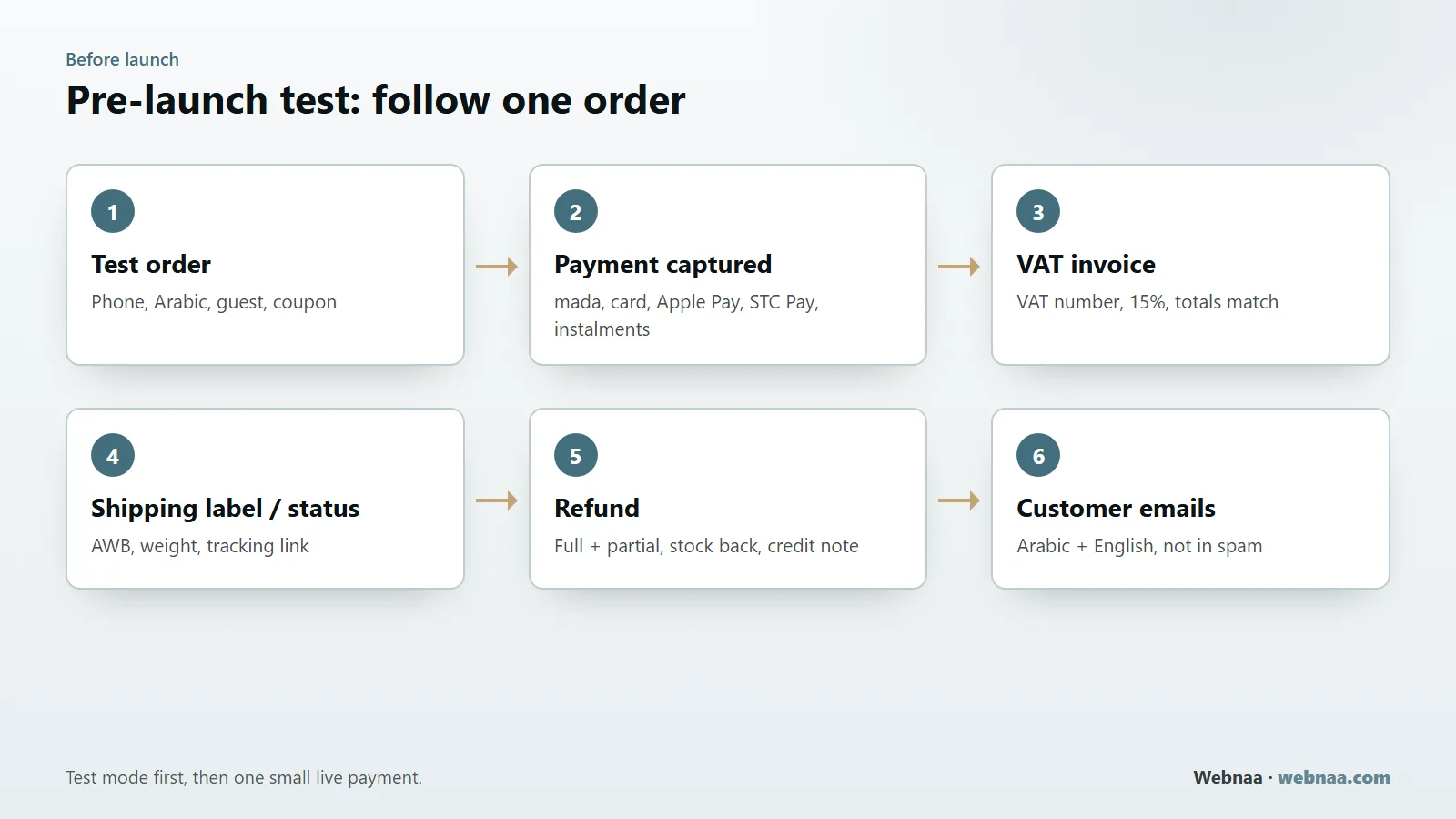
Run these six tests in the gateway's test mode, then repeat the first three with one small real payment on the live keys.
Place a test order
On a phone, in Arabic, as a guest: a product with a size or colour, a coupon, and an address in another city. Repeat in English on a desktop.
Confirm the payment is captured
Pay once with each method: mada, Visa or Mastercard, Apple Pay on an iPhone, STC Pay and each instalment option. The order should move to Processing, and the amount should match the gateway dashboard exactly.
Check the VAT invoice
The invoice shows your business name and VAT number, VAT at 15% on goods and on delivery where it applies, and totals that match the order to the halala.
Create the shipping label and status
Generate the label or airway bill through the courier plugin. Check the weight and city, and that the tracking link appears in the order and in the customer's email.
Refund the order
Issue one full and one partial refund. The money should return through the gateway, the order notes should record it, stock should go back, and a credit note should be issued where your invoicing needs one.
Read every customer email
Processing, completed, refunded and failed-payment emails in Arabic and English, sent from your own domain and not landing in spam.
Also try a declined card, a browser closed during card verification and an out-of-stock product. General items are in our website launch checklist.
WooCommerce Saudi Arabia costs: one-off and recurring
WooCommerce itself is free. The cost of a store is everything around it. We give no figures here because they depend on your catalogue and your providers; use the table to make sure every quote you receive covers each line.
| Item | One-off or recurring | What to check |
|---|---|---|
| Store design and build | One-off | Templates, languages, product import, integrations included |
| Theme | One-off or yearly licence | Tested in RTL; how long updates are included |
| Paid extensions (multilingual, invoicing, shipping rules) | Usually yearly licences | Renewal price, and what stops if a licence lapses |
| Hosting and SSL | Monthly or yearly | Resources sized for a store, backups, staging, renewal price |
| Domain and business email | Yearly, email per user | Registered in your name |
| Payment gateway | Per transaction; some add setup or monthly fees | Rate per method, refund handling, settlement time |
| Instalments | Per order | Merchant fee and payout timing |
| Shipping | Per shipment, plus cash-on-delivery fees | Rates by city and weight, returns |
| E-invoicing | Monthly or yearly | Phase supported, integration with ZATCA |
| Maintenance and changes | Monthly or per request | Updates, backups, restore tests, response time |
Add VAT to every line that carries it, and compare quotes over two or three years rather than on the build price alone.
What to ask before you hire a WooCommerce developer
- Which gateway and courier plugins will you use, and are they published by the providers themselves?
- Will the merchant, courier and hosting accounts be in my company's name, with administrator access for me?
- Which paid extensions are in the build, and what does each renewal cost per year?
- How will invoices meet ZATCA's requirements for my phase?
- Will you run the six tests above and show me the results before launch?
- Who updates and backs up the store after launch, and at what price?
- What do I receive at handover: admin and hosting access and licence keys?
Walk away from quotes with no plugin list, pirated "nulled" plugins, a gateway on the developer's own account, or promises of guaranteed sales or first place on Google.
How Webnaa builds WooCommerce stores
Webnaa is a web design company based in Riyadh that builds online stores on WooCommerce. Stores are not part of our website price calculator. Each store is priced separately, in a written quote, before any work starts. The price depends on the number of products and categories and how they are added, the payment gateway and shipping methods, whether the store is Arabic only or Arabic and English, and extra features such as connections to other systems. As our online store design service page sets out, we gather your requirements, send a written quote with the scope, timeline, price and the accounts and licences you will need, design and build on a test link with sample products, connect the gateway and run test orders on mobile and desktop, then launch on your domain and show you how to manage products and orders.
The store and its data are yours, and the payment gateway account is opened in your name. The quote includes hosting sized for the store and connecting your domain and business email; after the agreed period, renewals are charged at the provider's price at that time. Before we start, you need a commercial registration or licence that allows selling online, a payment gateway account and a delivery method. Our terms and conditions apply to every project, and the ways to pay Webnaa are on our payment page.
Selling only one or two products? A one-page site with a WhatsApp order button may be enough. Our website design service starts from SAR 39 a month, and a single page on your own domain is priced in our price calculator. If you would rather sell on a hosted platform, see our Salla and Zid store design service.
Choose what you need, see your exact price
The price updates with every choice. No surprises, no hidden fees.
The calculator is off. Press the power button to start
From Zoho, a global provider with data centres in Riyadh and Jeddah. More than 10 addresses are quoted separately.
Planning a WooCommerce store?
Tell us what you sell and how you want to take payment and deliver, and we will reply with a written quote.
FAQ
Is WooCommerce free to use in Saudi Arabia?
The WooCommerce plugin is free. Hosting, the domain, a theme, paid extensions, gateway fees per transaction, shipping and maintenance are not. Budget for them as recurring costs.
Does WooCommerce support mada payments?
Not on its own. mada comes through a gateway plugin and a merchant account with a licensed provider; Moyasar's plugin, for example, lists mada, Apple Pay and STC Pay.
Can WooCommerce issue ZATCA-compliant e-invoices?
WooCommerce core does not issue tax invoices. Use an invoicing plugin or an accounting system whose provider states compliance with ZATCA's requirements for your phase, including integration with ZATCA's systems when your Phase 2 wave applies.
How much does WooCommerce development cost in Saudi Arabia?
There is no standard price. It depends on products, languages, integrations and features, plus recurring hosting, licences and fees. Ask for a written quote covering each line of the cost table above.
Do I need a commercial registration to sell with WooCommerce in Saudi Arabia?
Payment gateways usually require a commercial registration or a suitable licence for your activity, and your merchant details must appear in the store. Store authentication runs through the Business platform; see our guide to Saudi website legal requirements.
Can a WooCommerce store be in Arabic and English?
Yes. WordPress and WooCommerce run in Arabic with right-to-left layouts, and a multilingual plugin adds English. Use a theme tested in RTL.
Summary
A WooCommerce store in Saudi Arabia is the free plugin plus layers you configure and own: riyal pricing and two languages, a licensed gateway for mada, Apple Pay and STC Pay, 15% VAT with a compliant e-invoicing route, shipping zones with a courier plugin, legal pages and suitable hosting. Open every account in your business's name, list every recurring cost, and follow one test order from payment to refund before launch.
Sources (checked October 2026): WooCommerce: server requirements, WooCommerce: setting up taxes, ZATCA: e-invoicing roll-out phases, WordPress.org: Moyasar Payments plugin, WordPress.org: Tamara Checkout plugin. Plugin features and requirements change; check the current listing before you build.