
Web design is the work of planning, structuring and shaping a website so that the right people can find it, understand it in seconds and take the next step, whether that is a call, a booking or an order. It covers much more than colours and layout: research, page structure, content, visual design, the build itself, accessibility, speed and search basics all belong to it. This guide explains each part in plain language, shows how a real project runs, and gives you the tools to judge a design and a quote with confidence.

In short:
- A website's design is a set of decisions about who it serves, what goes on each page, in what order, how it looks and how it behaves on a phone.
- The main parts are user experience, information architecture, content, visual design, the front-end build, accessibility, performance and search basics.
- A good project moves from goals and content to wireframes, visual design, build, testing and launch, and it does not stop at launch.
- Judge a design by what visitors can do with it, not by how it looks on the designer's large monitor.
- In Saudi Arabia, plan for Arabic first, a phone-first visitor and contact through WhatsApp, calls and maps.
In this guide
What web design actually means
Most people picture a designer choosing fonts and colours. That is part of the job, but it comes late. First someone has to decide who the website is for, what those people want to do and what each page must say. Only then does it make sense to decide how it looks.
A useful working definition: designing a website means turning a business goal into pages that a specific visitor can use without help. Every good design answers three questions for the person arriving on a page:
- Am I in the right place? The visitor should know within a few seconds what the business does and where it works.
- Can I trust this? Real photos, a clear address, a phone number and honest details carry more weight than slogans.
- What do I do next? One obvious action, such as calling, sending a WhatsApp message, booking or asking for a quote.
Take a small dental clinic in Jeddah. A patient looking at its site on a phone wants to know which treatments it offers, where it is, whether it is open this evening and how to book. A well-designed site puts those four answers within one or two thumb scrolls. A poor one opens with a slideshow of the building and hides the opening hours in the footer. Both may look modern. Only one does its job.
It also helps to know what web design is not. It is not only the home page, because many visitors land on a service page or an article straight from Google. It is not only coding, although the design has to be built well to work. And it is not a one-time event: a site that is never updated drifts away from the business it describes. "Website design" and "site design" mean the same thing.
The parts of a website's design
On a small project one person may cover several of these parts; on a large one each has its own specialist. Either way, all of them need doing.
User experience (UX)
How easy and reassuring the site feels to use: finding information, understanding options and completing a task. Nielsen Norman Group's ten usability heuristics include keeping users informed about what is happening, using words they already know and preventing errors. A form that confirms "Message received, we reply within one working day" is UX in action.
Information architecture
This is the structure: which pages exist, how they are grouped in the menu and how they link to each other. A contracting company might organise its site by service (fit-out, maintenance, MEP works) or by client type (offices, retail, villas). The right choice follows how customers think, not the internal org chart. The output is a sitemap, a simple tree of pages.
Content
The words, photos, prices, FAQs and documents a visitor came for. Content usually decides whether a site converts, yet it is the part most often left until the end. Designing around placeholder text produces layouts that break when real, longer Arabic copy arrives. Good projects collect or write content before the visual design is approved.
Visual design (UI)
The look and the interface: layout grid, typography, colour, spacing, icons, buttons and imagery. Its main job is hierarchy, showing what matters most first, and consistency, so a button always looks like a button. Our guide to colour and typography for Saudi brands goes deeper into the choices involved.
Interaction design
How elements respond when a menu opens, a form field is wrong or a button is tapped. Tap targets need to fit a thumb, error messages should say what to fix, and animation should guide attention, not slow people down.
Front-end build
Turning the design into working HTML, CSS and JavaScript, usually inside a system such as WordPress. A key idea is responsive design, which MDN describes as an approach that makes pages render well on all screen sizes: flexible grids, scaling images and layouts that rearrange at breakpoints.
Accessibility
Making sure people with visual, hearing, motor or cognitive disabilities can use the site. The W3C points out that accessibility also helps people on small screens, older users, someone with a temporary injury and anyone reading in bright sunlight. Readable contrast, text alternatives for images and forms that work with a keyboard are the basics. See our website accessibility checklist.
Performance
Speed is a design decision too. Hero videos, five font families and heavy sliders all cost loading time. Google's Core Web Vitals give clear targets: the main content should appear within 2.5 seconds, the page should respond to a tap within 200 milliseconds, and the layout should not jump around while it loads.
Search basics
Design sets the foundation for search: one clear topic per page, unique page titles, real headings, descriptive URLs and alt text that explains each image. Google's own starter guide says plainly that there are no secrets that automatically rank a site first. Good structure makes a site easier to find; it never guarantees a position. More in get found on Google.
If you want to go further into the first and fourth parts, our guide to UX and UI in web design covers user journeys, wireframes and testing with real users on a small budget.
Web design vs graphic design vs web development
These three fields overlap, and business owners often hire one expecting the other. Knowing the difference saves money and disappointment.
| Aspect | Graphic design | Website design | Web development |
|---|---|---|---|
| Main output | Logos, brand identity, print, social media visuals | Page structure, layouts, user journeys, interface | Working code, databases, integrations |
| Canvas | Fixed size: an A4 page, a post, a billboard | Fluid: from a small phone to a wide monitor | The browser and the server behind it |
| How people use it | They look at it | They scan, tap, scroll and act | They rarely see it directly |
| After delivery | Usually finished | Changes as content and offers change | Needs updates, security fixes and monitoring |
| Measured by | Recognition and visual appeal | Calls, bookings, enquiries, ease of use | Reliability, speed, security |
| Typical tools | Illustrator, Photoshop, InDesign | Figma, wireframing tools, the CMS | Code editors, frameworks, hosting tools |
A talented graphic designer is not automatically ready to design a website. Print designers control every pixel of a fixed page; on the web the same content has to work on a 390-pixel phone and a 1,920-pixel monitor, in Arabic and English. Equally, a strong developer can build almost anything, but may not ask whether a customer understands the menu.
A typical business website needs someone for structure, content and interface, and someone to build it cleanly on a maintainable platform, often one team. For a store with complex shipping rules or a booking system tied to internal software, development becomes the larger share. We break this down further in web design vs web development.
How a web design project runs, step by step
Every provider has its own names for the stages, but sound projects follow the same logic: understand first, structure second, decorate third, test before anyone outside sees it.
1. Goals and brief
Agree what the site must achieve and for whom. "More office fit-out enquiries from Riyadh companies" is a goal; "a modern website" is not. The brief also lists services, cities, languages and anything the site must connect to. Our website brief template gives you a ready structure.
2. Content and sitemap
Decide the pages and gather what goes on them: services, prices or ranges, photos of real work and the questions customers ask most. Most delays happen here, so start early.
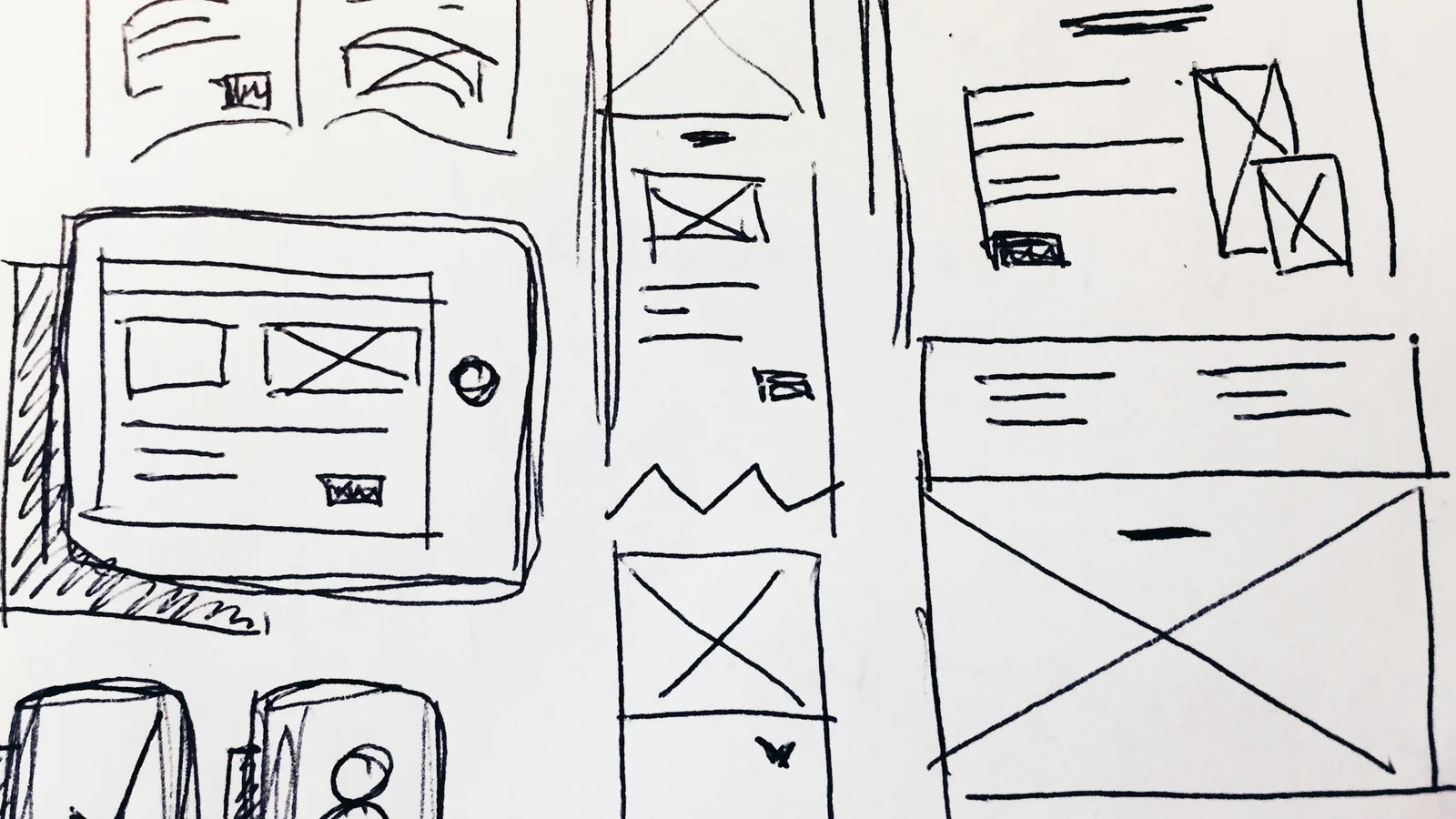
3. Wireframes
Simple grey-box layouts of the key pages, without colour or photography. They settle what goes where and in what order. Changing a wireframe takes minutes; changing a finished design takes days.
4. Visual design
The structure gets your brand: fonts, colours, imagery, buttons and forms. Ask to see the mobile version of each key page too.
5. Build
The design is built on the chosen platform, content is entered, and forms, maps, WhatsApp links and analytics are connected. The site lives on a private preview link at this stage.
6. Testing and review
Check every page on real phones and computers, in both languages, with forms sent to real inboxes. You review and request corrections before launch.
7. Launch
The site moves to your domain with an SSL certificate, the sitemap is submitted to Google Search Console, and old addresses are redirected if you are replacing an existing site.
8. After launch
Updates, backups, security patches, small edits and a look at what visitors actually do. Our guide to what to do after your website launches covers the first months.
How long does it take?
Timelines depend more on decisions and content than on design hours. A five-page company site with ready content can be built in days; the same site can take months when photos are missing, three partners each want changes, or the scope keeps growing. Three habits help:
- One decision-maker who sends one consolidated list of feedback.
- Content before design approval, or at least a full picture of your services and prices in week one.
- A parked list of phase-two ideas instead of new features halfway through.
If you are curious how we organise these stages ourselves, how we work shows our process from first message to launch.
How to judge whether a design is good
You do not need design training to evaluate a website, just a phone, ten minutes and the discipline to look as a customer, not as the owner. Use these tests on a proposal, a preview link or a provider's past work.
Five quick tests anyone can run
- The five-second test. Show the home page to someone who does not know your business for five seconds, then hide it. Can they say what you do and where? If not, the headline is too vague or the visuals are competing with it.
- The one-thumb test. Hold a phone in one hand and try to call, send a WhatsApp message and find the location. Each should take no more than one or two taps from any page.
- The task test. Pick a real customer task, such as "find the price of a teeth-cleaning appointment" or "request a quote for a 200 square metre office fit-out", and time it. Watch where you hesitate.
- The slow-network test. Open the site on mobile data. If you stare at a blank screen, visitors will leave before the design matters.
- The squint test. Step back and squint at a page. The most important element, usually the headline and the main button, should still stand out. If everything is equally loud, nothing is.
A checklist for the details
Once a design passes the quick tests, go through it more carefully. A good business website usually shows all of the following:
- Clear hierarchy: one main headline per page, short sections with meaningful subheadings, and only one primary button style.
- Readable text: body text you can read on a phone without zooming, with enough contrast. Light grey on white looks elegant in a mock-up and fails in daylight.
- Real proof: photos of your actual work, premises or products, plus the details that build trust such as a full address and a local phone number. Our article on trust signals that convert lists what customers look for.
- Specific copy: "Kitchen and bathroom renovation in north Riyadh, with a written quote within 48 hours" beats "Excellence in every detail".
- Forms that respect the visitor: only the fields you truly need, clear labels and a visible confirmation after sending.
- Speed: pages that show their main content quickly on mobile data. We explain why this matters commercially in website speed drives sales.
- No dead ends: every page ends with a next step, not just a footer.
A design is good when a stranger can use it on a phone without asking you a single question.
Be careful with taste. "I don't like blue" is a valid preference, but customers finding the booking button matters more than the shade of the header. Tie feedback to a visitor and a task: "a new patient won't find the evening hours" is something a designer can act on.
Designing for Saudi businesses: what changes
The principles are universal, but the Saudi market has its own habits. A template made for a Western audience needs real adjustment, not just a translation plug-in.
Arabic first, English done properly
Most local customers search and read in Arabic, while many companies also serve clients in English. A bilingual site is two linked versions, not one page with mixed languages. The Arabic version runs right to left, so the layout is mirrored: the menu, the column order, and arrows that show direction. Some things should not be mirrored, such as logos, phone numbers and media player controls. Arabic text also needs fonts designed for it, slightly larger sizes and more generous line height than Latin text. Our guide to bilingual website design covers structure, URLs and common mistakes.
Designed for the phone first
For most Saudi businesses, a large share of visitors, often the majority, arrive on a phone: from a Google Maps listing, a link shared on WhatsApp, an Instagram or Snapchat profile, or a search on the move. Check your own analytics, but plan the phone layout first. MDN's responsive design guidance recommends this order: one column for narrow screens, more columns as space allows. In practice that means a sticky call or WhatsApp button, short paragraphs, images cropped for portrait screens and menus that are easy to open with a thumb. Our article on designing for mobile first has a full checklist.
How customers prefer to get in touch
Many Saudi customers would rather send a WhatsApp message or call than fill in a form. Offer all three and make the fastest one the most visible. Add a map with the exact location, real working hours (including Ramadan hours) and the cities you serve.
Local trust details
Customers look for signs that a business is real and local: a Saudi phone number, a physical address and the commercial registration details. Online stores should also show the payment methods local customers use, such as mada cards and Apple Pay. If your forms collect names, numbers or other personal data, explain what you collect and why in a privacy policy. Our overview of Saudi website legal requirements and our PDPL website checklist go into the details; they are general guidance, not legal advice.
Calendar and culture
Ramadan, the two Eids, National Day and the school year change what people search for, so plan updates around them. Use photography of your real setting and keep imagery appropriate for a conservative audience; stock photos of foreign offices make a Riyadh business look less local.
What web design costs to commission
There is no fixed price for a website, in the same way there is no fixed price for a building. What you pay depends on scope, who does the work and, just as important, who looks after the site once it is live. The main routes look like this:
| Route | How you pay | What you get | Watch out for |
|---|---|---|---|
| DIY website builder | A monthly plan plus your own time | Templates you assemble and maintain yourself | Your time, generic layouts, limits on growth |
| Freelancer | Usually a one-off fee | A small site built by one person | What happens after handover, and if the freelancer becomes unavailable |
| Agency project | A larger one-off fee, often in milestones | A team covering structure, design, content and build | Running costs and maintenance quoted separately |
| Custom development | A project fee plus ongoing development | Bespoke features, portals and integrations | Long timelines; only worth it when you truly need custom logic |
| Managed subscription | A fixed monthly fee | Design, hosting, domain, updates and support together | Who owns the files, and what leaving involves |
Within any route, these factors move the price most:
- Number of unique page layouts. Ten pages built from three templates cost less than ten one-off designs.
- Languages. Arabic and English means two sets of content and two layouts to test.
- Content. Copywriting and photography are real work; a quote that includes them looks higher but often saves weeks.
- Features. Online payment, booking calendars, customer accounts and connections to accounting or CRM tools each add their own cost.
Then add the running costs that return every year and that quotes often leave out: hosting, the domain, business email, plugin licences, updates and small edits. Ask whether each figure includes VAT, and compare options over two or three years, not on launch day. For current price ranges and a worked three-year comparison, read our guide to website design costs in Saudi Arabia.
Common mistakes, and what to ask before you hire
Most disappointing websites fail for the same handful of reasons. None of them is about talent; they are about priorities.
Designing for the owner
The home page opens with the company history and the chairman's message, while customers want services, prices and location. Lead with what visitors need; put the story on the About page.
Copying a competitor
Their site was built for their customers and goals, and you cannot see whether it works. Borrow ideas, not structures.
Decoration that slows the site
Autoplay videos and large sliders impress on office Wi-Fi and frustrate a customer on mobile data.
Hidden contact options
A phone number buried in the footer or a contact page with only a form loses the customers who were ready to act. Make contact visible on every page.
No plan after launch
An old price list and a gallery that stopped in 2023 suggest the business stopped too. Decide before launch who updates the site.
Our list of website mistakes that cost customers covers more of these with fixes.
Questions to ask any provider
Whether you are speaking to a freelancer, an agency or a subscription service, get written answers to these before you pay anything:
- Which pages are included, in which languages, and how many design revisions?
- Who writes the content, and who supplies the photos?
- Will I see the design on a preview link, on my own phone, before launch?
- Which platform will the site use, and can I update simple text myself?
- Is the domain registered in my company's name? If it belongs to the designer, moving it depends on their cooperation.
- What is included after launch: hosting, updates, backups, edits? What does each extra cost?
- Who owns the site files, and what happens if I want to leave?
- What is the delivery date, and what do you need from me first?
Be wary of anyone who promises first place on Google, quotes a single number with no itemised scope, or cannot show live work. For a full selection process, read how to choose a web design company, and use our guide to what a website proposal should include to compare offers side by side.
Working with Webnaa
Webnaa is a website design service in Saudi Arabia, based in Riyadh, serving businesses in the Kingdom and beyond. Our main service targets the problems above: late content, recurring costs and sites nobody looks after. Our website design service for companies starts from SAR 39 a month, and every other website is priced in our price calculator by type, pages and languages, with no setup fee and no long contract. For example, a 5-page bilingual WordPress website is SAR 324 a month and includes:
- A professional WordPress website with an easy dashboard and up to 5 pages, each in Arabic and English.
- Content written for you, based on the details you give us about your business.
- Hosting, SSL and a domain registered in your name (a standard domain, not a premium one).
- A fast, mobile-friendly site with an enquiry form, photo gallery, map location, WhatsApp button and a direct call number.
- Search engine setup with Google Search Console and a sitemap, a ready privacy policy and terms, and a printable QR code.
- A preview link within 24 hours at most from receiving all the information and content we need from you, so you review everything before launch.
- Technical support, free fixes for any technical fault caused by how we built the site, and a dashboard to edit your site yourself.
If you do not like the design, you get a full refund. You can cancel at any time with no cancellation fee, and your website stays live until the end of the paid period. Prices are shown per month but paid in advance, every 6 months or for a full year with 10% off, and from year two you pay only the monthly base. A new page after launch is added to your subscription at its calculator price. If you would rather own the website outright, you can buy it: the website value (one year at 10% off, without articles) plus an independence fee of 30% of the undiscounted year, SAR 4,665 for this example, including a year of hosting and the domain in your name. The domain, content and data are always yours. All the details are on our pricing page, and you can browse design samples to see the kind of sites we build.
Choose what you need, see your exact price
The price updates with every choice. No surprises, no hidden fees.
The calculator is off. Press the power button to start
From Zoho, a global provider with data centres in Riyadh and Jeddah. More than 10 addresses are quoted separately.
For projects beyond a company website, such as an online store on WooCommerce, store design on Salla or Zid, a custom web system or a website redesign, we send a written quote that states price, scope and delivery date before any work starts.
A business website, designed and looked after
See our prices, from SAR 39 a month, then send us your business details to get started.
FAQ
What does a web designer actually do?
They work out what a site needs to achieve, structure its pages, plan the content, design layouts for phone and desktop, and often build them on a platform such as WordPress. Larger projects split this between specialists.
Is web design the same as web development?
No, although they overlap. Design decides what the site contains, how it is organised and how it looks and behaves. Development turns that into working code and handles databases, integrations, security and hosting. A typical business site needs both, often from one team.
How long does it take to design a business website?
A small company site with ready content can take days; larger projects with many stakeholders often take several weeks or months. Content and decisions usually set the pace. At Webnaa, a subscription website’s preview link is sent within 24 hours at most from receiving all the information and content we need from you.
Can I design my own website without coding?
Yes. Website builders and WordPress themes need no code. The harder parts are structure, content, mobile usability, speed and accessibility. A builder can work for a simple site if you have the time; if not, a professional saves you weeks.
How much does web design cost in Saudi Arabia?
It ranges from a monthly builder plan you run yourself to large custom projects, depending on pages, languages, content, features and who maintains the site. Add running costs and VAT to every quote. Webnaa's prices start from SAR 39 a month with hosting included, and a 5-page bilingual WordPress website with the domain, content writing and a dashboard to edit your site yourself is SAR 324 a month in our price calculator.
Is WordPress a good choice for a business website?
For most company sites, yes: it is widely used, flexible and easy to update from a dashboard. It does need regular updates and sensible plugin choices. For special requirements, compare it with custom code in our article WordPress or custom code?
Summary
Designing a website means turning a business goal into pages a real visitor can use without help. It joins user experience, structure, content, visual design, the build, accessibility, speed and search basics, and it continues after launch. Judge a design with a phone in your hand and a customer task in mind. In Saudi Arabia, put Arabic, the phone and fast contact at the centre, then compare providers on scope, ownership and after-launch care, not on the first number in the quote.
Sources: Nielsen Norman Group: 10 usability heuristics for user interface design, W3C WAI: introduction to web accessibility, MDN: responsive design, web.dev: Web Vitals, Google Search Central: SEO starter guide. Webnaa: a first website for small businesses, pricing.